


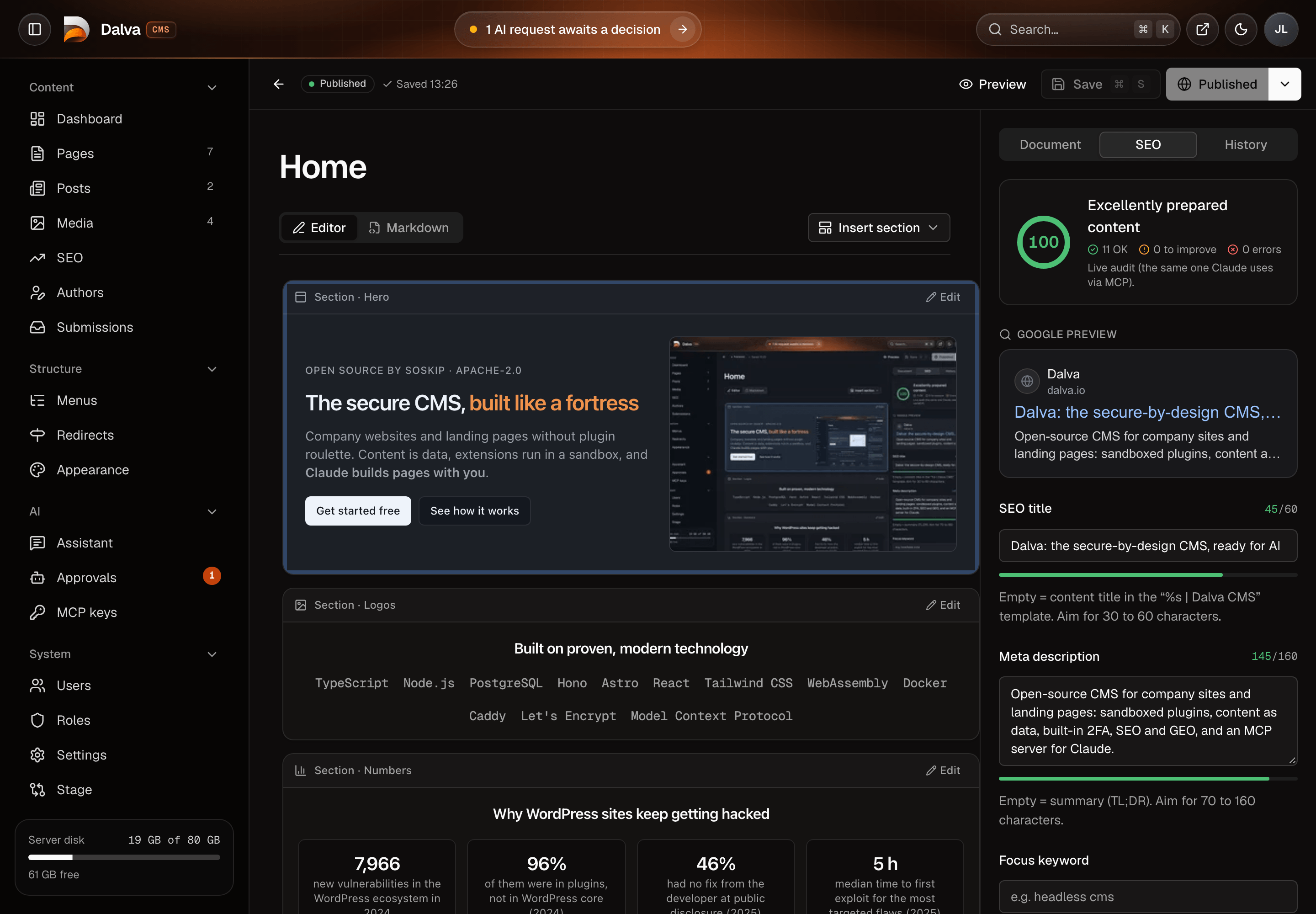
The secure CMS, built like a fortress
Company websites and landing pages without plugin roulette. Content is data, extensions run in a sandbox, and Claude builds pages with you.
Built on proven, modern technology
- TypeScript
- Node.js
- PostgreSQL
- Hono
- Astro
- React
- Tailwind CSS
- WebAssembly
- Docker
- Caddy
- Let's Encrypt
- Model Context Protocol
By the numbers
Why WordPress sites keep getting hacked
It is rarely WordPress itself. Thousands of third-party PHP plugins run with full access to your server and database, and every one of them is a door.
- new vulnerabilities in the WordPress ecosystem in 2024
- 7,966
- of them were in plugins, not in WordPress core (2024)
- 96%
- had no fix from the developer at public disclosure (2025)
- 46%
- median time to first exploit for the most targeted flaws (2025)
- 5 h
Sources: Patchstack, State of WordPress Security in 2025 (2024 data) and in 2026 (2025 data).
The difference
Stop firefighting plugins
On a typical WordPress site every plugin is PHP code with full access to your server and database. This is what running one feels like, and what it looks like without that risk.
Open issues: 8
A typical WordPress site
- CVE Critical XSS in a form plugin. Update now
- UPDATE 14 plugins need updates
- ALERT New admin account created at 03:12
- CVE SQL injection in a slider plugin, no fix yet
- BACKUP Last backup failed
- MALWARE Injected script found in the theme footer
- CVE Privilege escalation in a membership plugin
- PERF Cache plugin conflict, pages slow
With Dalva
0 plugins with access to your server
Plugins run in a WebAssembly sandbox, content is validated data, and updates are one versioned release.
Highlights
Secure by design: Dalva removes the doors instead of guarding them
Security is not a plugin you install later. It comes from the architecture, so whole classes of attacks are impossible by construction.
-
Content is data, not HTML
Every page is validated JSON blocks. There is nowhere to hide a script, so stored XSS is impossible by construction, and the same format feeds Claude, your apps and the website.
-
Plugins in a sandbox
Plugins run in WebAssembly with memory and time limits, no file system and no database. A human reviews and approves every version.
-
Logins that resist phishing
Argon2id passwords, enforced 2FA, passkeys, leaked-password checks and sudo mode for sensitive actions.
-
Nothing executable on the server
No PHP, no theme file editor, no uploads that can run. Read-only containers, a least-privilege database role and an append-only audit log.
-
AI with guardrails
Claude works through scoped MCP keys: drafts and change requests only, live changes after your approval.
-
Fast without caching plugins
Server-rendered pages with almost zero JavaScript, CDN-ready headers and instant cache purge on publish.
WordPress vs Dalva, side by side
| Category | Typical WordPress site | Dalva |
|---|---|---|
| Plugins | PHP plugins with full server and database access | WebAssembly sandbox, declared permissions, human approval |
| Content | HTML stored in the database (XSS risk) | Validated blocks: no HTML, no scripts |
| Logins | 2FA through yet another plugin | 2FA, passkeys and leaked-password checks built in |
| Updates | Core, theme and dozens of plugins to patch | One versioned release, one command: ./dalva update |
| SEO and AI search | Several plugins to configure | JSON-LD, sitemap, llms.txt, IndexNow and AI-bot policy built in |
| AI editing | Copy-paste from a chatbot | Claude via MCP, with drafts, previews and approvals |
AI under control
Claude writes. You approve.
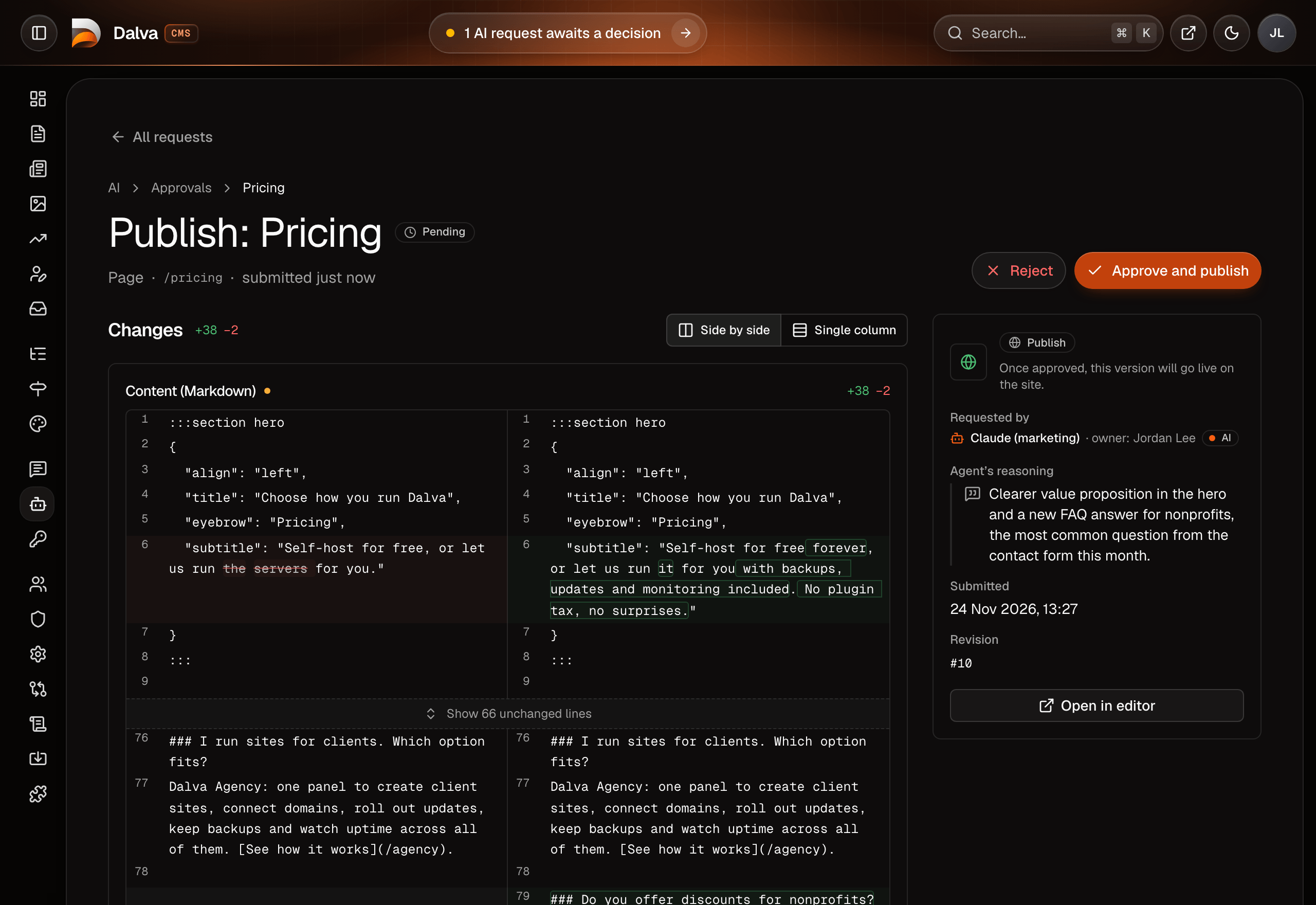
Connect Claude through MCP and ask for a landing page, an article, a whole theme or a plugin. Everything arrives as a draft or a change request with a visual diff, and every call lands in the audit log.
- Scoped keys with rate limits and IP allow-lists
- Change requests with side-by-side diffs
- One click revokes a key, instantly
Themes
Designer-grade looks without touching code
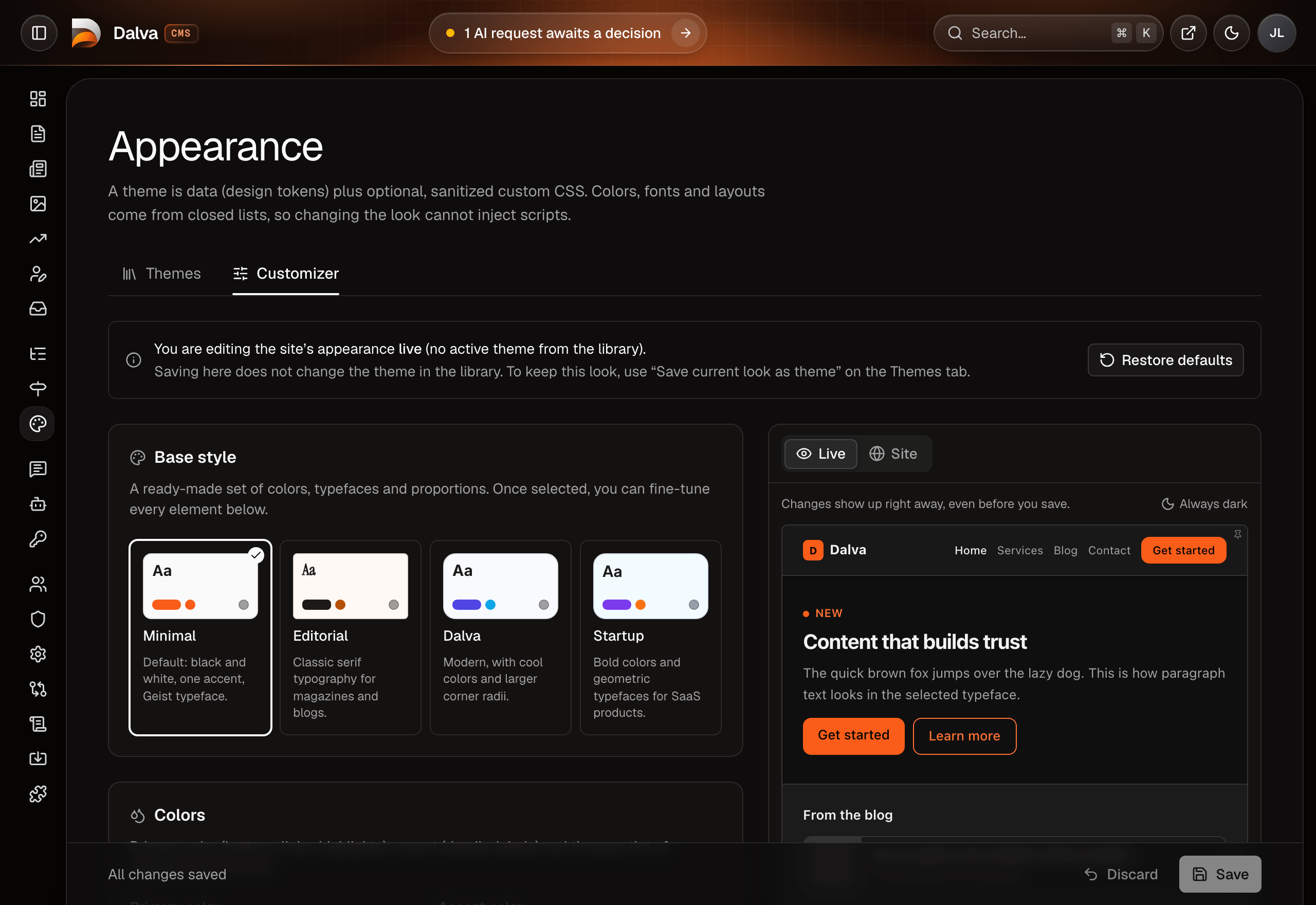
Colors, typography, radius, motion and header layout live in the theme, so every page updates together. Preview a theme live before it goes public, or let Claude design one for you.
- Live preview before activation
- Light and dark mode with a visitor toggle
- Contrast checked for accessibility
Highlights
Everything a modern company site needs
-
SEO and GEO built in
Live audits, JSON-LD for organizations and local businesses, llms.txt, Markdown for every page and IndexNow.
-
Contact forms with an inbox
No JavaScript needed, spam protection without CAPTCHA or tracking, GDPR consent and automatic retention.
-
13 section types
Hero, features, pricing, team, gallery, FAQ, contact and more: build landing pages from tested blocks.
-
Scales horizontally
Stateless instances, read replicas, Redis and S3 or R2 switched on with environment variables.
-
Roles and approvals
Granular permissions, enforced 2FA per role, review flows for people and AI alike.
-
One-command install
Docker Compose with automatic HTTPS, backups, restore and emergency switches included.
Highlights
Your leads, straight into the tools you use
Official add-ons for HubSpot, Notion, Zapier, Google and more install in one click, after you see exactly what they may do. Each runs in a WebAssembly sandbox with network access only to the service it declares.
- Leads
Lead emails
Every enquiry lands in your team inbox from your own domain, and “Reply” goes straight to the customer.
- Leads · CRM
HubSpot CRM
Form submissions become HubSpot contacts automatically, updated instead of duplicated.
- Leads · CRM
Notion
Each enquiry becomes a row in your Notion database: a lightweight CRM your team already uses.
- Automation
Zapier and Make
Send leads and publishing events to thousands of apps, every request signed with HMAC.
- Blocks
Google reviews
Your real Google rating and latest reviews on the page, refreshed daily by the server. No Google scripts for visitors.
- Blocks · SEO
Service pricing
A clean price list with Offer structured data, readable for people, Google and AI answers.
Highlights
For agencies: every client site in one panel
Dalva Agency is a control panel for agencies and freelancers who run many client sites on Dalva CMS. Create a site from a template, connect its domain, then update, back up and monitor every site from one place, on your own servers.
-
A client site in a few steps
A guided wizard asks for the client, a starter template, the name, the domain, the server and a resource plan. Every new site gets a working address right away.
-
Updates in waves, with rollback
A canary site goes first, then waves of sites. A site that fails its health checks is rolled back automatically and the rollout pauses.
-
Isolated sites, encrypted backups
Each site has its own containers, database and files. Backups are encrypted before they leave the server and restore-tested every week.
Get started
Live in minutes
One command on your server, then a guided installer in the browser: site name, your account, a starter template. Connect Claude Code next, and use the cache-friendly public API when you need it.
# in the Dalva directory./dalva setup # open the installer link it prints:# https://your-domain.com/admin/setup?token=…# create an MCP key in the panel: MCP keysclaude mcp add --transport http dalva \ https://your-domain.com/mcp \ --header "Authorization: Bearer $DALVA_MCP_KEY"cp .env.example .envdocker compose up -ddocker compose ps# public content API (GET only, CDN-cacheable)curl https://your-domain.com/api/public/v1/sitecurl "https://your-domain.com/api/public/v1/resolve?path=/pricing"FAQ
Frequently asked questions
Can’t find your answer? Write to us and a person replies, not a bot.
Is Dalva more secure than WordPress?
It is designed to remove the most common causes of WordPress compromises: unsandboxed third-party plugins, HTML content and bolt-on authentication. No software is unbreakable, so Dalva also ships an audit log, emergency switches and regression tests for every security fix.
Do I need to know how to code?
No. You build pages from ready-made sections in the editor and change the look in the theme.
How do I connect Claude?
Create an MCP key with the scopes you want in the panel and add your site’s /mcp address in Claude. Changes from AI wait for your approval.
Can I migrate from WordPress?
Yes. Upload the standard WordPress export file and Dalva moves your pages, posts, images and Yoast or Rank Math SEO, then adds 301 redirects so your old URLs and rankings keep working. Scripts, shortcodes and plugin code stay behind, and a report shows exactly what changed.
Is it free?
Yes. Dalva is open source under Apache-2.0. Managed hosting by soskip is coming soon.
Get started
Stop patching plugins. Start shipping pages.
Run ./dalva setup, open the installer link and answer four questions. HTTPS, the database and the admin panel configure themselves.
- Content is data, not HTML
- Plugins in a WebAssembly sandbox
- 2FA and passkeys built in
- Claude writes, you approve
- Append-only audit log
- Open source, Apache-2.0